Skip to content

Blog#

Newsletter: March 2026 Update

The latest updates to PHP Tools for Visual Studio Code introduce a broad set of improvements focused on developer productivity, language support, and deeper code intelligence. Across the past development cycle, the extension has gained new language features aligned with the latest PHP releases, expanded framework awareness, improved navigation and debugging workflows, and numerous refinements to code analysis.

What's New in PHP extension for Visual Studio Code (December 2025 – January 2026)

The end of 2025 and the beginning of 2026 brought another substantial update to the PHP extension for Visual Studio Code by DEVSENSE. This release focuses on deeper code understanding, smarter refactorings, better framework support, full alignment with the latest PHP language changes, and stability. Alongside major IntelliSense improvements and advanced generics support, we’ve also delivered significant performance optimizations to make your daily development smoother than ever.

Optimize Native Function Invocation

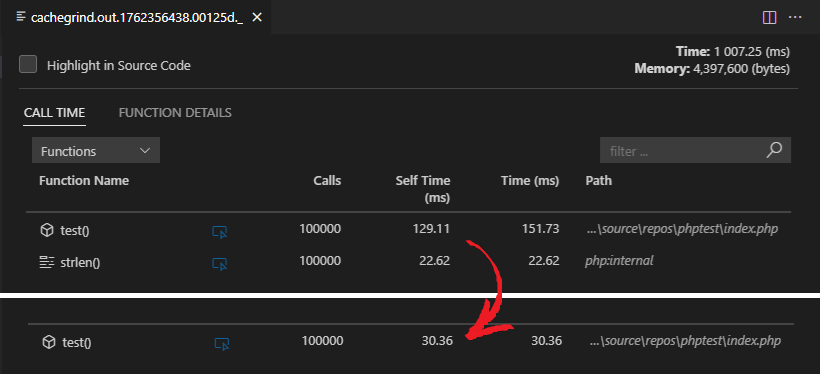
PHP has come a long way from being an interpreted scripting language for home web pages to a pretty fast object-oriented compiled language running the most powerful websites on the Internet. As part of its performance boost are various compiler optimizations. In this blog post, we'll focus on a subtle feature that makes applications automatically faster (although just slightly): optimizing native function invocation.

optimize native function invocation

PHP Tools for VS Code – Version 1.61

Pest Tests & Data Providers

September update (1.61) introduces support for Pest tests. This means, your tests defined using it() and test() methods are seamlessly listed in the VSCode's Testing panel, tests can be inspected, run, debugged, or profiled. Additionally, the editor inside your test anonymous function provides full IntelliSense for $this variable and its members. Let's see how it works.

Run and Debug Pest and PHPUnit Tests in VS Code

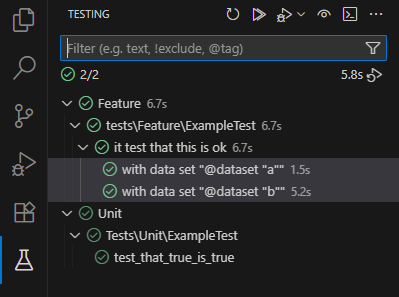
Test Explorer in Visual Studio Code opens the door to all your PHPUnit and Pest PHP tests. You can browse and filter test suites, test classes, test cases, and data sets. Run, debug, profile, or navigate to any test. You can enable automatic testing on changes, browse test history, and see detailed diffs of actual and expected results. Let me show you how.

test explorer

PHP Tools for Visual Studio Code – Version 1.59

We’re excited to announce the release of PHP Tools for Visual Studio Code version 1.59! This update delivers a wide range of improvements and new features — from enhanced Laravel support, powerful code actions, and improved IntelliSense, to diagnostics and formatting refinements.

Let’s take a look at what’s new: