

PHP Tools for Visual Studio: Faster IntelliSense, Composer Dependencies, Diagnostics#
The September update of PHP Tools for Visual Studio brings a wide range of improvements to IntelliSense, code analysis, formatting, Composer integration, and the overall editing experience.
This release is particularly focused on performance and large PHP codebases. Code completion has been reworked to take better advantage of multi-core CPUs, while improvements to type inference, diagnostics, and project indexing make PHP Tools more accurate when working with complex applications and large dependency trees.
Fast Code Completion for Large Projects#

Code completion is one of the most frequently used parts of an IDE, so even small delays can have a noticeable impact on the development experience.
We have re-implemented the code completion integration in Visual Studio to make it significantly faster by taking advantage of multi-core CPUs. The completion list now appears almost instantly, with little to no delay while typing.
The difference is especially noticeable in large projects. A codebase containing 10,000, 50,000, or even more classes can put considerable pressure on symbol lookup and completion filtering.
The new implementation keeps completion responsive even as the number of symbols grows.
Fully Qualified Name Completion#
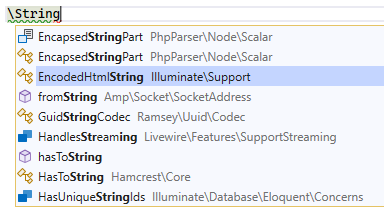
PHP normally allows classes and functions to be referenced either through an imported name or by their fully qualified name (FQN).
PHP Tools now provides a convenient completion experience for FQNs.
When you start typing a backslash \, code completion lists symbols under the namespace you have entered so far. Confirming a suggestion inserts the fully qualified name directly, without adding an import or alias.
For example, you can type:
and use completion to find PaymentService directly.
This can be useful when you deliberately want to avoid adding a use statement—for example, when a class is only used once or when you want to make the namespace of a particular dependency explicit.
Code Completion Shows Deprecations#
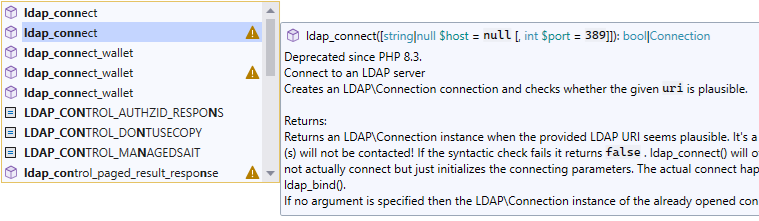
Code completion now indicates deprecated and removed symbols with a warning icon.
The information is based on the PHP version configured for the project, allowing the completion list to provide more context about the APIs you're using.
This is especially useful when a function has several possible overloads or related symbols and only some of them are deprecated.
Instead of discovering the problem later through a diagnostic or during an upgrade, you can see the information directly while completing the code.
Tip: Treat deprecations as migration hints#
Deprecations are often the first indication that code will require changes when upgrading PHP.
When maintaining a long-lived application, paying attention to these warnings can make future PHP upgrades considerably easier. PHP Tools surfaces this information directly in IntelliSense, where you're already choosing the API to use.
New .EditorConfig Settings#
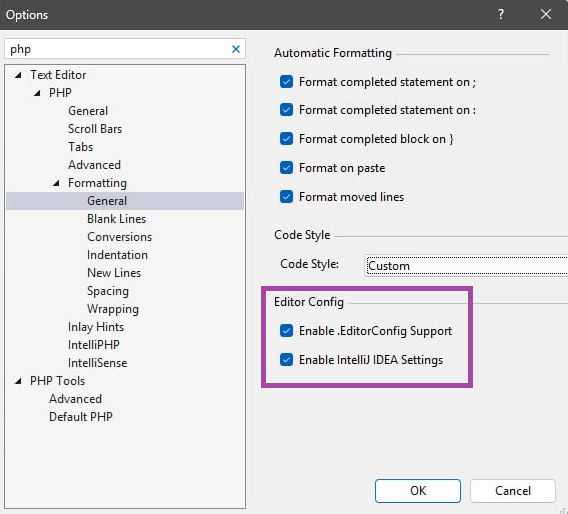
PHP Tools now provides additional formatting settings under Tools → Options → Text Editor → PHP → Formatting.
Enable .EditorConfig Support#
Enabled by default, this option reads formatting settings from .editorconfig files in your project and applies the relevant rules to the current PHP file.
Individual PHP formatting directives are documented in the formatting documentation.
Using .editorconfig is particularly useful for teams because formatting preferences can be stored alongside the source code and shared through version control. This means that formatting configuration can travel with the project instead of requiring every developer to configure their IDE manually.
IntelliJ IDEA Formatting Settings#
PHP Tools can also recognize formatting directives imported from IntelliJ IDEA editors using ij_php_*** directives.
This makes it easier for teams migrating from PhpStorm or IntelliJ IDEA to Visual Studio to keep their existing formatting configuration.
Together, .editorconfig support and IntelliJ IDEA directives provide a convenient way to share formatting conventions across different development environments.
Long Paths Support#
The internals of PHP Tools have been updated to properly handle long directory names and file paths.
This is particularly useful for projects located deep within a directory hierarchy or applications with Composer dependencies containing deeply nested packages.
Previously, PHP files with paths exceeding 260 characters could be ignored and therefore not indexed by IntelliSense.
For Composer-based applications, this can be particularly problematic because the dependency tree may contain deeply nested namespaces and package directories.
With improved long-path handling, these files can now participate correctly in project indexing and code analysis.
Composer Dependencies Tree#
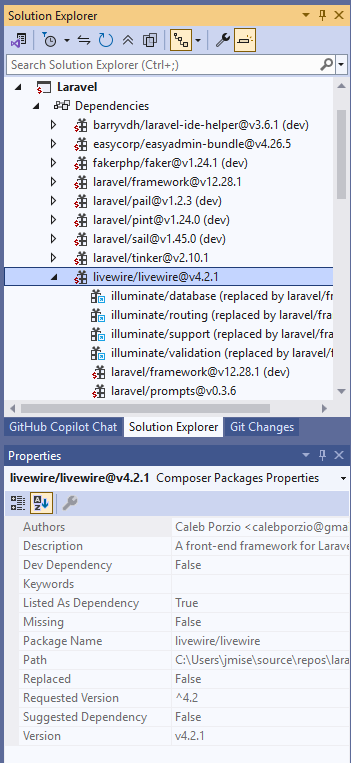
A new Composer tree is available under the project's Dependencies node in Visual Studio 2026 and the latest updates of Visual Studio 2022.
The tree provides a structured view of the Composer packages installed in your project.
You can inspect dependencies and their properties, as well as update or remove existing packages directly from Visual Studio.
This provides a more integrated workflow for Composer-based PHP projects: instead of switching between the IDE and a terminal for common dependency-management tasks, you can inspect the dependency graph directly inside Solution Explorer.
Tip: Understand your dependency tree#
Composer applications can depend on hundreds of packages, either directly or indirectly.
When investigating a problem, it is often useful to distinguish between a package declared directly in composer.json and a package installed as a transitive dependency.
The Composer tree makes this dependency structure easier to inspect while working on the project.
More Accurate Diagnostics#
The diagnostics engine has received a number of improvements to provide more accurate analysis and more useful code fixes.
PHP Tools now reports additional problems in callable syntax, including invalid function names, unknown functions, and invalid indirect calls through __invoke().
Analysis has also been improved for:
- property access,
instanceofexpressions,- variadic parameters,
- callable expressions,
- and other PHP language constructs.
Code fixes have been expanded as well. For unknown types, PHP Tools can now suggest implementing missing interface properties and generating appropriate PHPDoc type information.
Deprecation diagnostics can also use replacement information provided by the #[Deprecated] attribute and PHP stubs.
More Precise Type Inference#
Type inference has been improved in several areas, resulting in more precise analysis and fewer false-positive diagnostics.
PHP Tools now better understands:
- conditional return types,
- arithmetic involving BCMath functions,
numeric-stringvalues and their implicit conversions,- return types of functions such as
array_first(), - and various real-world type transformations.
Unused underscore variables are also handled more appropriately during type analysis.
Conditional return types#
Modern PHP projects frequently use PHPDoc annotations to express relationships that cannot be represented directly by PHP's native type system.
For example:
/**
 * @template T
 * @param T $value
 * @return T
 */
function identity(mixed $value): mixed
{
    return $value;
}
When generic annotations and conditional return types are combined with real-world framework code, accurately propagating the resulting types becomes increasingly important.
Improved type inference allows IntelliSense and diagnostics to make better use of this information.
Improved Support for PHPStan and Psalm#
Modern PHP codebases increasingly rely on static-analysis annotations from tools such as PHPStan and Psalm.
PHP Tools continues to improve compatibility with these annotations and their type-system extensions.
This is particularly important for applications using:
- generics,
- array shapes,
numeric-string,@psalm-if-this-istag and similar,- conditional return types,
- framework-specific annotations,
- and complex inferred types.
For example:
/**
 * @param array{
 *     id: int,
 *     name: string,
 *     active: bool
 * } $user
 */
function processUser(array $user): void
{
    $id = $user['id'];
    $name = $user['name'];
    $active = $user['active'];
}
The annotations describe the structure of the array, allowing IntelliSense and diagnostics to understand the individual fields rather than treating the value simply as
array.
The result is better completion, navigation, and error detection without requiring runtime type checks everywhere in the application.
Smarter Snippets#
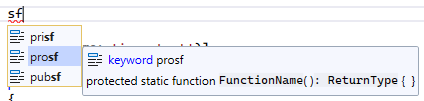
Snippets have been expanded and improved.
A new thr snippet makes it easy to insert a throw new ... statement.
Function snippets now also follow the familiar conventions used by PhpStorm, making the experience more predictable for developers who work across different PHP IDEs.
Snippets can be inserted using the Tab key.
PHP Tools also displays snippet previews in tooltips, making it easier to understand what will be inserted before confirming a suggestion.
This is especially useful for snippets containing multiple placeholders or boilerplate code.
Editor and IntelliSense Improvements#
The editor and IntelliSense experience includes numerous smaller improvements across PHP language features.
Inlay hints#
Inlay hints can now display parameter names for indirect function calls, providing additional context when the relationship between an argument and its parameter is not immediately obvious.
Abstract members#
Code actions for implementing members now also take abstract properties into account.
This makes implementing contracts and abstract classes more complete, particularly in codebases that make extensive use of typed properties.
PHPDoc#
PHPDoc parsing and type simplification have been improved, resulting in better type information throughout IntelliSense.
Navigation and tooltips now also provide better support for array-syntax callables and other special PHP constructs.
Better WordPress Support#
WordPress support has also received several improvements.
PHP Tools now provides better:
- hook discovery and navigation,
- references to WordPress hook names,
- completion and documentation links for WordPress functions and classes,
- support for structured WordPress types.
For WordPress development, understanding hooks is particularly important because much of the framework's behavior is based on registering callbacks rather than traditional method calls.
Improved hook discovery makes it easier to navigate between the registration point and the code that handles a particular hook.
Completion Based on #[ExpectedValues]#
PHP Tools can now use the #[ExpectedValues] attribute when providing code completion.
The attribute can describe the values expected by a function or method parameter, allowing IntelliSense to suggest valid arguments directly.
For example:
When calling the function, completion can use the attribute information to suggest the expected values.
This is a good example of how metadata can make dynamically typed APIs more discoverable without changing their runtime behavior.
Fixes and Smaller Improvements#
This release also contains numerous fixes and smaller improvements across IntelliSense, navigation, formatting, and code analysis.
CodeLens references now correctly handle namespaced global functions and property positions.
Various code actions have been improved, including handling of:
usestatements,- parentheses,
is_null(),- formatting-related actions.
Smart indentation has been improved for attributes, while PSR-12 formatting now handles blank lines more accurately.
Navigation and reference detection have also been fixed for constructors, Laravel controller methods, WordPress-related code, and other PHP constructs.
PHPDoc handling has received additional improvements, including better recognition of:
Objecttypes,- tentative types,
@propertydefinitions,- parameter annotations.
The PHP parser has also been updated with improved PCRE support and more accurate error positions for certain regular expressions.
Additional fixes improve completion filtering, visibility keyword handling, and various edge cases throughout IntelliSense and code analysis.
More to Come#
This update continues our focus on making PHP Tools for Visual Studio a complete PHP development environment - standardized across devices, editors, and IDEs, from editing and IntelliSense through Composer, diagnostics, navigation, refactoring, debugging, and project-wide code analysis.
That is the direction we're continuing to develop PHP Tools in: fast, deep code intelligence for modern PHP projects, whether you're working on a small application or a large codebase, with standardized behavior across your IDEs and editors.